Step 1:
Login to your VPS via SSH.
Step 2:
Type the command and execute to check the partition and devices id :
df -h
Step 3:
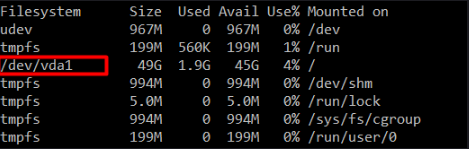
The default partition name should be /dev/vda1
To verify, please list the summary of the disk partition as follows :
Step 4:
To grow your partition you can do it, execute the following command to resize the partition:
resize2fs /dev/vda1 24G
(For example, if your purchased VPS SSD size are 25GB, type, resize should grow to 24G)
Step 5:
Verify the partition size using the following command:
df -h
If you are facing any problems, please revert back to our support team by opening a ticket for immediate assistant.
If you have important data in the server, please do a full backup to your own storage, and please note that resize the partition at your own risk.